

























The FINDER portal offers a live sharing link function. You can share your real-time location with family, colleagues, or the police in emergencies such as theft or robbery.
Absolutely. All data is encrypted, and regular updates ensure that your information is protected against new threats. Furthermore, we adhere to strict data protection regulations to safeguard your data.
The FINDER portal works on desktops, tablets and smartphones and is available for iOS and Android.
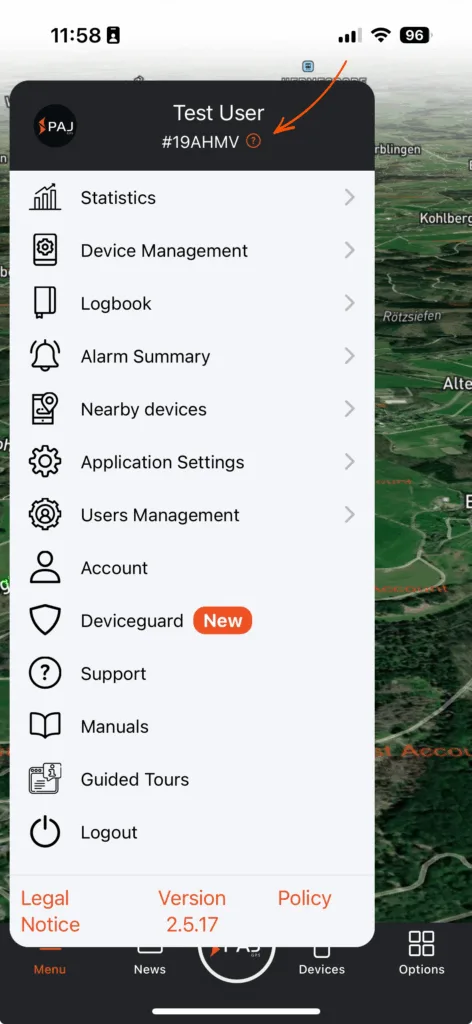
When calling our support team, please provide your Service PIN.
You can find your Service PIN in the Finder Portal app. Simply open the menu and look under your name.
You can find all our products in our store. In addition to our appliances, you can also purchase accessories. Do you need advice? Take a look at our purchase advisor page or contact us personally.
Payment options in our online store:
– Prepayment / bank transfer
– Direct bank transfer
– Credit card
– Apple Pay
– Google Pay
– PayPal
We have summarized the information for you here: Payment options at PAJ. Payment options for the license in the FINDER Portal:
– PayPal
– Apple pay
– Google pay
If none of the above payment options are available to you, you can also transfer an annual license in the form of an invoice. Please contact our customer service for this.
No, you do not need to register in the online store to place an order. You have the option of ordering as a guest. Simply enter the required data during the ordering process.
Yes, if you purchased your order with a prepayment method, you receive normally an automatic shipping confirmation from your local logistics company once your order has been dispatched. If you cannot find it, please check also your spam folder.
Orders via paj-gps.co.uk:
If you have ordered via our online store at www.paj-gps.co.uk, you will receive your invoice at the e-mail address you provided when placing your order. If you have not received the invoice or require another copy, please contact us. We will then send you an invoice in PDF format by e-mail.
Orders via Amazon:
If you have ordered an item from us via Amazon, you will automatically receive the invoice in your Amazon e-mail inbox within the first week of the following month. The invoice is of course issued on the date of your order and you fulfill all possible VAT obligations.
Other platforms or sellers:
If you have purchased your FINDER via another platform or from another seller, please contact your seller directly. They will be able to help you most quickly.
Problems with your order?
Our customer service team will be happy to help you with any problems you may have.
Please contact us by e-mail:
General inquiries: info@paj-gps.com
Support requests: support@paj-gps.com
Available by phone:
Monday – Thursday: 09:00 – 16:00
Friday: 08:00 – 14:00
(excluding public holidays)
Phone: +49 (0) 2292 39 499 59
WhatsApp: +49 176 5781 0417

 DE
DE FR
FR ES
ES IT
IT PT
PT USA
USA AUS
AUS